Random Bits – Q1 Tweets and Links of Note

Gosh, time flies when the to-do list is stacked full.  Right now, I’m gearing up head to TechEd in Atlanta in a few weeks (more on that later), but meanwhile, here are some fun and informative tweets and links from the last quarter that you might have missed!

Videos
Upgrading from Windows 1 to Windows 7 – http://ow.ly/49wir (Mar 7)
@dondonais – RT @buckleyplanet: A new video on how to become a SharePoint site admin (a warning to all) http://youtu.be/-1B2o2ENyi4 (Dec 29)

Social Media
@BAoki – Good social media reminders for newbies and veterans alike from @chrisbrogan http://www.chrisbrogan.com/socialmediaetiquette/ (Feb 25)
@amndw2 – Via @tcarmody, “Five Emotions Invented by the Internet” http://bit.ly/ijPfpP All hauntingly familiar. (Jan 15)

All About IPv6
@spamvikktim – A politically incorrect guide to IPv6, Part I – http://jl.ly/2011/02/18#v6incor (Feb 19)
@joeklein – List of websites supporting #IPv6 http://bit.ly/gmEWNN of the 990476 tested websites only 2903 have one or more IPv6 addresses. (Feb 9)
@sambowne – ty @frankbaitman Brilliant USC video explains the 4 billion Internet addresses and the limits of #IPv4 http://bit.ly/erQQgL (Feb 3)

Other Tweets
@rhalbheer – Something to be proud of: Ethisphere Institute: Microsoft amongst the world’s most ethical companies http://ow.ly/4kskk (Mar 23)
@briankrebs – If you’ve been scratching your head over RSA’s “statement”, read Steve Gibson’s take. You’ll probably learn a lot. http://bit.ly/haJy4x (Mar 19)
@garthobrien -25 Things I Hate About Google, Revisited 5 Years Later http://ow.ly/1bPTHx (Mar 19)
@Nonapeptide – New TheNubbyAdmin.com blog post: The Failure of a SysAdmin – A Tale of Laziness, Good Fortune and Self Loathing http://bit.ly/i2yWfq (Mar 17)
@MSSolutionAccel – Plan your response to malicious software BEFORE it happens! – Solution Accelerators IPD guide for Malware Response http://bit.ly/eBx4oP (Feb 17)

Happy Surfing!

Surviving TechEd

TechEd 2011 is drawing near, so I thought I’d share my personal list of “Rules to Survive TechEd”. Perhaps they will help you this year in Atlanta or at another multi-day conference you might have coming up.
  1. Register Early; Your Hotel is Key – Unless you have some special requirement or reason to stay at a particular hotel, you should register as early as possible so that you can pick a hotel within what you would consider walking distance to the conference center. I hate being at the mercy of the shuttles every morning.
  2. Prepare to Walk a Mile in Your Shoes – Most conference centers are large sprawling venues, last year TechEd spanned over a mile within the New Orleans Conference Center. Wear comfortable shoes and expect to get some exercise.
  3. Food and Beverage – Conference fare varies from year to year and location to location and it’s not always the highlight of the event. While some previous TechEds provided a hot breakfast and lunch, that’s not always the case. Also, depending on the contract of the venue, you may not find the soda brand of your choice provided. So you might have to make other arrangements or be flexible. The reality is that no matter what food is provided, not everyone is going to be happy.
  4. Know Where You’d Like To Be (but don’t expect to be everywhere) – Every year I as I work on building my schedule, I find that I want to be in several sessions at the same time or attend a session in every possible time slot. With over two dozen learning opportunities during the course of TechEd, my brain is simply on track to seize up and crash if I don’t pace myself. Take advantage of the content that will be posted online post-conference and skip a session or two. It’s amazing what a little down-time can do for you.
  5. Don’t Jump Sessions – It’s annoying when you have multiple sessions to choose from in one time slot and the one you decide on is a dud. However, don’t try to run over to your next pick. By the time you walk to the session, you’ll have missed a good portion of it and will likely not get as much out of it as you’d hope. Either stick with your first pick (since you’ll likely find at least one “jewel” to take away from it) or bail and take that time to hit a TLC or community lounge area – you might find an answer to a burning question there instead.
  6. How Much Swag Do You REALLY Need? – Seriously, a dozen vendor T-shirts? That flying pig? Another plastic thingamabob that glows green? I managed to get to the conference with only carry-on bags and I like to save those checked baggage fees for something other than branded pens and blinking buttons. Until vendors start bringing a stash of shirts smaller than an XL, I’ll keep swag collection to a minimum.  I prefer taking away new ideas for implementing technologies in my work or making new contacts for future conversations.
I’m looking forward to another great conference full of networking and learning opportunities.  If you don’t pass me tearing from end to end between sessions, look for me at the MDOP booth in the TLC.

Ed Horley and Stephen Rose on RunAs Radio

Have you checked out RunAs Radio lately? 

Since 2007, RunAs Radio has been producing podcasts for Microsoft-centric IT Professionals and over the last few weeks has produced episodes featuring some of my favorite industry collegues – Ed Horley and Stephen Rose.  On 3/30/11, Ed Horley discussed the current state of the transition from IPv4 to IPv6 and on 3/23/11, Stephen covers Windows vNext, IE9 and Intune.

Here are a few other older podcasts from some others I know in the Microsoft technology space that you might enjoy.

  • 11/24/10 – Episode #187 – Mark Minasi on Cloud Technologies
  • 9/22/10 – Episode #178 – Alan Burchill on Group Policy Preferences
  • 9/8/10 – Episide #176 – Chris Jackson on app comp issues with those old IE6 applications

Upcoming Tech Events

For those of you looking for some technology events in San Francisco over the next week, here is what’s on my calendar:

All Tied Up with Cables!

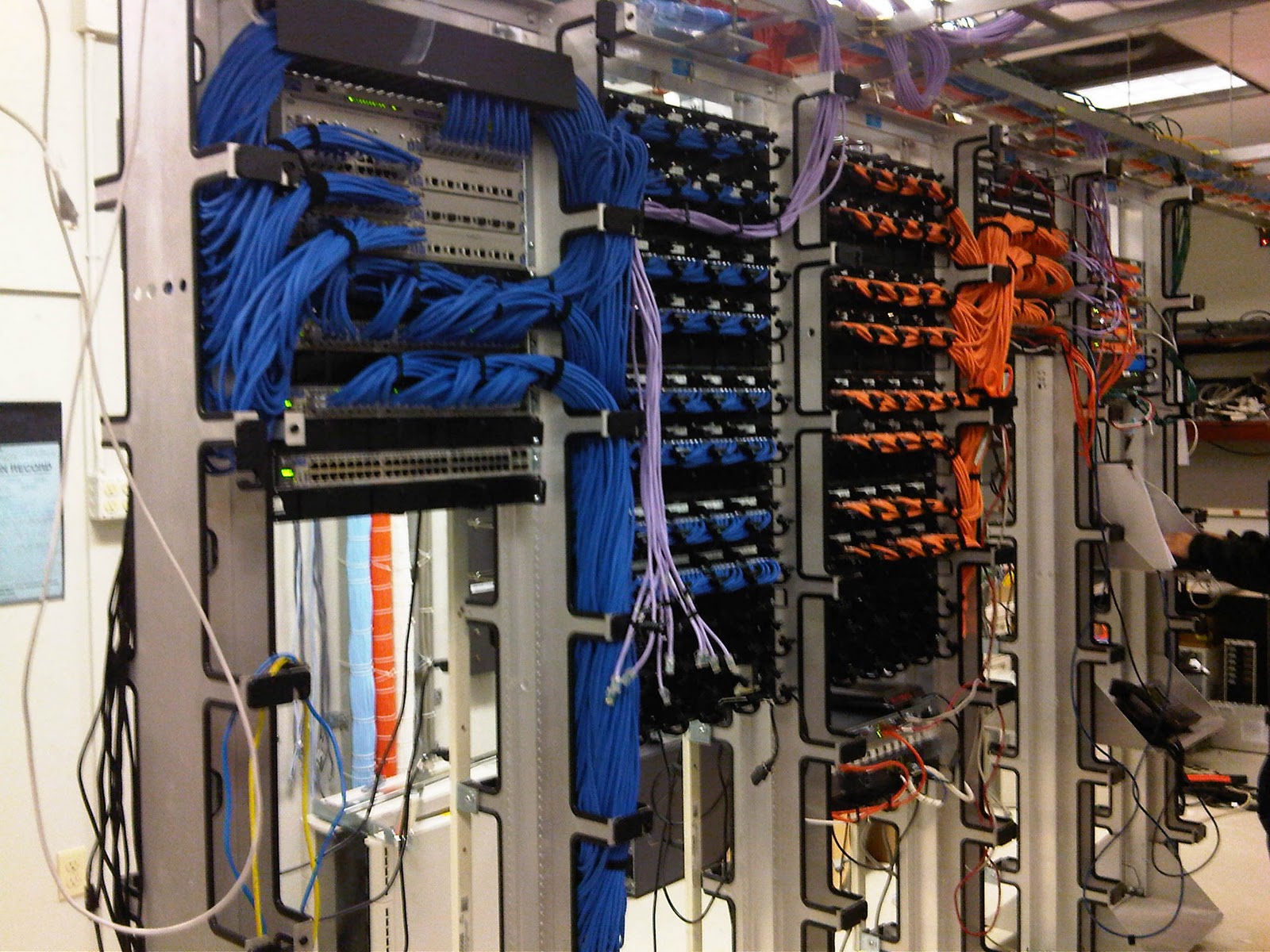
This month, one of our data center projects was to clean up the mess of cabling that had gotten out of hand after years of adds, moves and changes to switches and other equipment.  I find it interesting that with so many wireless devices around and so much talk of using virtualization and the cloud, we still spend so much time tangled in cords and cables!  Cable management can often be a challenge and this had become downright embarrassing.  Here is a before picture:

We took on a pretty extensive list of tasks as part of this clean up, including replacing server older networking components with a single new Cisco ASA.  While it’s usually not recommended to make several logical and physical changes at the same time so you can avoid troubleshooting nightmares later, we were taking advantage of a planned power outage and wanted to accomplish as much as we can while we had everything turned off – including rebalancing all our servers on our power circuits, updating our UPS firmware and recabling every server and workstation port in the data center. 
Here is shot of the same racks after the project was nearly complete.  It’s like night and day!

Everything is labled and color coded for ease of use.  And we were lucky that all of our servers, appliances and services were powered on and returned to service without much trouble.  This project also forced me to update several out-of-date diagrams and charts that are used for managing the network. 

While it was a crazy weekend with our own version of a “spaghetti western”, the end result was well worth it!

Tomorrow is World Backup Day

What have you backed up lately?

If you are a systems admin, you probably already have a backup solution in place at the office or for your clients.  Take some time tomorrow to check in on those processes to make sure you aren’t missing something important and that they are working the way you expect.

At home, check on or implement a solution for your important files and photos on your home computers.  It can be as simple as purchasing a portable drive or using a cloud based solution.  I’m a SugarSync fan myself.  If you want to check out SugarSync for yourself, use this referral code and get some bonus free space.

With the proper backup solution in place, your home laptop can be almost instantly replaceable with no worries.  I recently reinstalled the OS on my netbook and was able to sync all my data files right back on with SugarSync.  It’s easy and helps me sleep better at night!

Learn more about World Backup Day at http://www.worldbackupday.net/

Upcoming – TechDays Technology Guru Speakers!

PacITPros and LearnIt have teamed up to bring you an opportunity to learn more about the future of mobile and cloud technologies. Todd Lammle and Mark Minasi will be joining forces on April 5th from 1pm-6pm, covering some great topics.

Todd will cover Cisco’s plans for taking wireless networks to a new level, Mark will cover the future of the cloud and then they will join forces to discuss IPv6 and the future of the related networking technologies.

When: Tuesday, April 5, 2011 (1pm – 6pm)
Where: Microsoft: San Francisco Office (835 Market St.)
Cost: $79 
Register at:
http://techdays.org/2011/03/todd-lammle/

This speaker series takes place right before the regular April PacITPros meeting, so rest up for a jam packed afternoon and evening of tech talk.

Coming Soon – DaRT 7!

This week a MMS, Microsoft announced the upcoming beta of DaRT 7, the Diagnostic and Recovery Toolkit. The beta will be out in early April and customers can sign up for the beta at http://go.microsoft.com/fwlink/?LinkID=213952.
Some of the new features to look forward to are:

  • Added remote control functionality – remotely control a machine that won’t even boot into Windows by using WinPE.
  • Fully supported USB Boot, as well as network boot and local installation.
  • Local Tool Security – restrict the locally installed tools so that they can only be used during a remote recovery request to your helpdesk.

Learn more on Springboard by checking out this Q&A with Stephen Rose and Brad McCabe on the Windows Team Blog.

Random Bits

Here a some random bits of tech info that have caught my eye recently – enjoy!

  • If you’ve so busy you haven’t had a chance to look up and have missed the news, IE 9 was released on Monday.  Check out more or download it at http://www.beautyoftheweb.com/.
  • This is a bit older, but Kindle added page numbers to their e-reader in March and this post covers more about how it works.  I wasn’t that bothered by the lack of them, but it’s cool that it’s an option for those who need them.  I have the orginal Kindle, so I won’t get page numbers with my version, but eventually I’ll be tempted to upgrade!
  •  Going to TechEd in Atlanta this year?  Check out their new MyTechEd portal – start a discussion, check out session topics and more.

Shopping for Hard Drives? Pay Attention to Sector Sizes

Disk drive manufacturers are transitioning to the production of Advanced Format disk drives, which have 4 KB physical sector size instead of the traditional 512 bytes.  While larger sectors will ultimately improve performance, many applications are not written to take advantage of the change, so a transitional technology called “512-byte emulation” is used to support the 512 byte logical addressing.  These disks are known as “512e” disks, for short.
Advanced Format drives will ultimately be the future standard, however some applications may have issues with the transitional 512e drives, especially if you are imaging a machine to new hardware and the OS and applications aren’t expecting a difference in physical and logical sector sizes.
Microsoft has a hotfix available for Windows 7 and Windows Server 2008 R2 than can address several potential issues introduced with this type of disk.  Check out KB 982018 for additional details and several known issues.  I’d be particularly aware if you are doing any P2P migrations of servers that support Active Directory, DHCP or act as a CA, as the ESENT engine is sensitive to the reporting of sector size, as detailed in issue #1 of the knowledge base article.