
Destination: VMWorld

I really enjoy conferences and if you’ve been reading my blog for a while, you’ll know I’ve been a long time attendee of Micosoft TechEd. Before I joined Microsoft, my previous company was (and still is) virtualizing on VMWare. But VMworld was the conference of choice for my teammate, who primarily handled the storage and virtualization infrastructure. So even though VMWorld is often hosted right in my backyard, I’ve never been.

So for the first time, I’ll be attending VMWorld next week. This is the 10th Annual US VMWorld and since I missed attending my 10thTechEd this past June, this seems apropos.  I mentioned this to some friends, who immediately said, “What? Are you some kind of spy now?”

A Spy? Really?

If you’ve been reading the “VMWare or Microsoft?”blog series this week, you’ll know that Evangelists here at Microsoft take virtualization pretty seriously. But truly, it’s all about taking TECHNOLOGY seriously. VMWare has been around for a pretty long time in “technology years” and they’ve brought a lot of stuff to the table that’s worth learning about.

I know it’s easy to get “religious” about the technologies you know best. As an IT Professional it’s important to look at a variety of solutions before deciding which one is best for your company or the particular problem you are trying to solve and there are often a lot of factors to take into consideration.  When dealing with those types of decisions myself, I valued the opinions of people who had taken the time to really understand what’s out there along with the pros and cons – particularly for products I wasn’t as familiar with.
Like many large multi-day conferences, the sessions and tracks are vast at VMWorld and it’s been hard to decide how best to spend my time. In doing a little preparation for this event, it seems that VMWare historically had a habit of talking about technologies at VMWorld that ended up not being released in a reasonable time frame.
Apparently there has been shift in recent years to concentrate only on technologies that will come to fruition in the next year, so I’m happy to find out that my time at the conference will be well spent learning about things that will be out there for IT Pros sooner than later. The software-defined datacenter and Infrastructure-as-a-Service look like they are going to be hot topics.
I’m looking forward to catching sessions around these areas:
  • vCloud Hybrid Service – There is a “Jump Start” series of 5 breakout sessions covering topics like architecture, networking and security, deploying workloads and cloud management of the VMWare vCloud product. In addition to the jump start, there are many other sessions around this service that look like good picks.
  • Storage and Data Protection – sessions around the VMWare Virtual SAN and SSD, Software-defined Storage and data protection and other storage advancements.
  • Operations Management – Sessions around cloud computing management, building your infrastructure, cloud economics, the evolution of the data center.
  • Virtualizing Active Directory – There is one session that caught my eye about Active Directory (always near and dear to my heart), so I probably won’t be missing that one.

I learned from my former teammate that session seating is prioritized for people who put sessions in their Schedule Builder tool, so I’m hoping I’ve chosen wisely. I generally don’t recommend session hopping at these type of events and this reinforces my plan to get a few good takeaways from every session I attend.

So to answer the question from earlier – Am I spying on VMWare? Nah, far from it.

Like every other conference I’ve attended throughout my career, I’m forever a student of technology. Be it Microsoft technology or not, I don’t think I can ever go wrong looking for opportunities to learn. I can’t be good at my job and you can’t be good at yours unless we all take the time to learn about what’s out there and are open to comparing a variety of solutions.

So that’s why I’ll be at VMWorld. Meanwhile, I hope you’ll continue to check out the posts in the “VMWare or Microsoft?” series.  On Twitter, the hashtag is #VMWorMSFT.  And for news of the conference, follow the tweets of @VMWorld.

And since I’m a VMWorld newbie, if you think there is something I shouldn’t miss, let me know!
It’s All New on October 18th!

What’s all new on October 18th?  Windows, of course!

Check out these announcements made this morning:

With all the downloading that will be going on that day, there won’t be time for much of anything else. 🙂

VMWare vs. Microsoft?

For the next 6 weeks, the US Microsoft Evangelists are teaming up to do a blog series comparing VMware technologies to Microsoft. We’ll be tackling the myths and mysteries surrounding the virtualization technologies and then you can decide which one is best for your organization. 

Kevin Remde is keeping the full list of them in this “Complete Series” post, but you’ll be touring the blogs of all the evangelists as the topics are posted.

Enjoy!

Home Tech Support: What happen to my picture thumbnails?

You know you have to do it.  Your parents, your sister, grandpop… they all ask for help with their computers when you are around.  So here’s a quick one I got during my family vacation last week – The thumbnail view of a folder my father kept pictures in wasn’t showing the photos anymore.

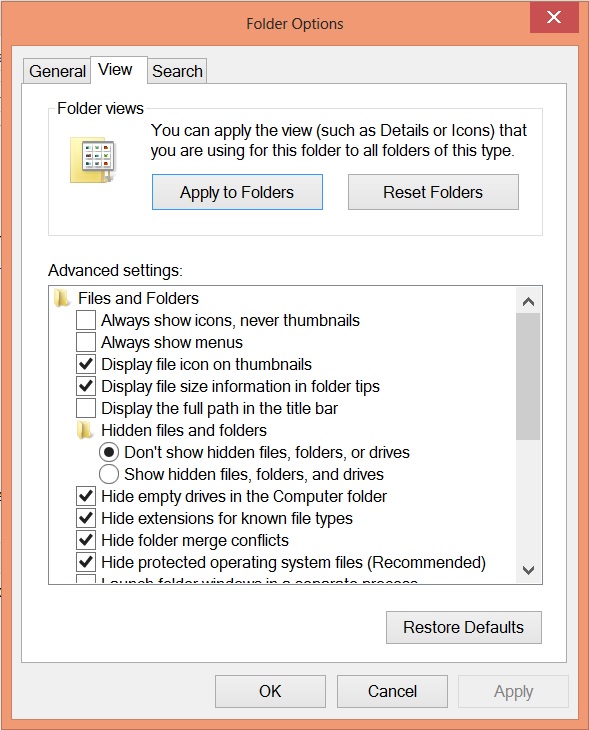
Somehow the setting for “Always show icons, never thumbnails” was selected in the Folder Options settings, under the View tab. 

I’m guessing an application change it, though I wouldn’t be totally surprised to find out he was mucking around in there.

Another reason thumbnails might not show up is if the hard drive is mostly full.  Windows will stop generating thumbnails to save space.  That was the first thing I checked, but wasn’t the issue in this case.

Get a Head Start this August… Evaluations, Training and Events

Time flies when you’ve started a new job, let me tell you! I’ve been spending a lot of my days learning new LOB applications, trying to read up on new technologies and brush up on some current technology that I haven’t needed to pay much attention to in the past.  I’ve even booked a slot to take my next certification exam, Upgrading your MCSA to Windows Server 2012.

So what am I using for all of that?

Well, I always fall back to books and articles on TechNet, but this time around I’m also doing a course on at the Microsoft Virtual Academy.  I’m also going to take the TechNet Virtual Labs  for a spin as well.

I’m also playing around with the previews of Windows 8.1 and Server 2012 R2. You can get download evaluation version of that software and trying it out for yourself. There are a slew of great new features in each of those products that I’m looking forward to seeing in action. If you need a place to spin that stuff up, sign up for your Azure trial.

If you are looking for some in person events, check out my calendar of events in the sidebar. I’ve been trying to fill in dates for some of the events coming up this summer. Here are some highlights for August:

Now, back to work for me!


Sysadmin Appreciation Day Coming!

Don’t forget that Sysadmin Appreciation Day is on Friday, July 26th!  If you are a sysadmin, this might be a great time to take advantage of a floating holiday you’ve been saving. 

If you AREN’T a sysadmin you might want to take a look around for your nearest helpdesk support person, the guy who last fixed your misbehaving keyboard, the person who helped you solve that problem with your voicemail, the gal who configured your mobile phone with corporate email, or the guy who restored that file you were looking for from last week’s backup.

If you need ideas for how to celebrate or appreciate your neighborhood sysadmin, visit http://sysadminday.com/.

Your Enterprise – Windows 7? Windows 8? Both?

Corporate IT can be a funny place. As a Systems Admin, I was always torn between wanting to be able to install the latest software and making sure that the primary business needs were being met. For a long time, Windows XP met those needs. The required applications ran, the staff was comfortable.

And then came the push for getting to Windows 7.  It was a long road to get applications working on Windows 7 and getting those desktops upgraded. The road has been so long in fact for some, that many are facing a fork where they feel they have to decide between Windows 7 and Windows 8. But there really isn’t a decision to be made. Windows 7 and Windows 8 can both be used in the enterprise, depending on the needs of the workers in your organization.

Let’s consider the existing Windows 8 Enterprise version, which I’m running on a Surface Pro. Now, since I’m just an end-user here at Microsoft, I can really only guess what they do to manage my device.  (A strange experience for me, I admit.)

It’s got MDOP MBAM on it for BitLocker management, System Center Endpoint Protection and it’s domain joined with a nice collection of group policies pushed down to it. It’s running Office 2013 with SkyDrive Pro.  Connecting to work via DirectAccess has been completely painless from my end and I’ve managed to tie in both my personal SkyDrive accounts (I have two Live IDs, don’t get me started) and my SkyDrive Pro. And all of that syncs to my Windows 8 phone. Plus some 3rd party stuff I’ve used for long time to sync other data, like Evernote and SugarSync, works just fine.

 
Has it taken some getting used to?  Sure.
 

Can I generally get to everything I need easily? Yes.


Do I still live mostly on the classic desktop? Yes.


Does the Start menu bug me?  Nope.

Windows 8 might not be right OS for every person in your organization – a tablet might not be the right device for your accounting department, a touch screen might not be what your HR
department needs to do their job.  But for those people in your office that are laptop users, juggle meeting after meeting with the notes and the slides and bouncing from remote work to hanging out in the office, well, Windows 8 might just be the ticket to their greater success.

There are a crazy amount of machines with different form factors that make using Windows 8 fun. And this is just with the current release of Windows 8. With the coming of Windows 8.1 (check out http://preview.windows.com, if you haven’t already) it’s even MORE enterprise ready.

Connecting your laptop to a monitor? Windows 8.1 makes improvements to the UI that take advantage of different screen resolutions, provides better support for keyboards and mice and allows you to boot straight to the desktop.

Need to multitask between several modern apps?  You can have up to 4 modern applications on screen and have multiple modern applications on different screens if you have more than one monitor connected.

Embracing BYOD in your organization? Use Workplace Join to grant access to corporate resources. Automatically sync data back to your data center with Work Folder. And with Remote Business Data Removal, only wipe corporate information when a user leaves your organization with heir device.

Need to know more? Check out the Springboard Series post “Windows 8.1 Preview: An Enterprise Call to Action” for more details about how evaluate the preview and review updated deployment tools.

All the News That’s Fit to Recap!

Welcome July!  I can’t believe half of 2013 is over already and so much has been happening and changing. If you’ve been busy enjoying the great Bay Area weather the last few days or working hard on your summer plans, you might have missed a few of these key bits of news.

  1. As of this morning, the TechNet Subscription is retired. Check out nicely comprehensive post about what options are available once your TechNet Subscription expires, by Kevin Remde. Also be sure to visit the FAQ for additional detailed information at www.aka.ms/TNSFAQ.
  2. You can get Microsoft Surfaces at some of you favorite resellers. If you’ve been eyeing Surfaces for your business, but couldn’t get them from you standard reseller it’s time to look again. Read more about this on the Surface Blog.
  3. As of last week, the Windows 8.1 Preview is here!  Download it from http://preview.windows.com.  When released closer to the end of 2013, it will be a free upgrade for licensed users of Windows 8.  There will also be an 8.1 update for the Surface RT.
  4. If you are looking for preview software for some of the other releases from June, look no further than the Evaluation Center for the previews of Hyper-V Server 2012 R2, Windows Server 2012 R2,  Windows Server 2012 R2 Essentials and the System Center 2012 R2.

I hope your bandwidth can stand all the downloading!

Certification Notes: For the Summer, Consider 70-417

Looking for something else to read about? Need to add something else to your list of things to accomplish?

If you hold any of the current certifications list below and haven’t thought about taking an exam in a while, you might want to check your calendar and thing about upgrading your certifications this summer. Several of the exams required for these certifications will be retired on July 31, 2013 and the certification will then be considered “legacy” and no longer attainable once August roles around.

  • MCITP: Server Administrator on Windows Server 2008
  • MCITP: Enterprise Administrator on Windows Server 2008

The 70-417 exam is the upgrade exam for to bring all these certifications up the new MCSA: Windows Server 2012. This exam also will also upgrade:

  • MSCA: Windows Server 2008
  • MCITP: Virtualization Administrator on Windows Server 2008 R2
  • MCITP: Enterprise Messaging Administrator 2010
  • MCITP: Lync Server Administrator 2010
  • MCITP: SharePoint Administrator 2010
  • MCITP: Enterprise Desktop Administrator on Windows 7

While this might not affect your current certification status, it’s always a good thing to check in on retiring exams regularly and reassess your goals for staying current with technologies.

Mid-June: Upcoming Live and Virtual Events

If you are looking for some economical training around “the cloud” here are few upcoming events you might like to consider.

These two are online via the Microsoft Virtual Academy:

  • Building Private Cloud with Windows Server 2012 & System Center 2012 SP1 Jump Start (with Symon Perriman & Pete Zerger)
    • Tuesday June 18th, 9:00 am – 5:00 pm PDT
    • http://aka.ms/MVA-WsSc
    • Topics include: Planning Your Cloud Implementation, Building the Cloud Fabric, Preparing for Self-Service, Building Your Service Catalog
  • Moving from Private to Hybrid Cloud with System Center 2012 and Windows Azure IaaS (with Matt McSpirit & Pete Zerger)
    • Thursday June 20th  9:00 am – 5:00 pm PDT
    • http://aka.ms/MVA-Sc-IaaS
    • Topics include: Monitoring, Management and Operations, Connecting System Center to the Public Cloud, Service Delivery and Automation in the Hybrid Cloud, Reaching the Summit: ITIL-integrated Self-Service in the Hybrid Cloud

If you are in the San Diego area and looking an event to attend in-person, check out the California Technology Summit, also being held on June 19th.